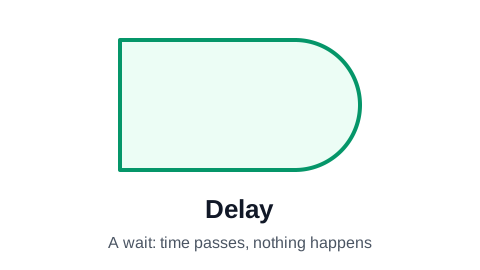
Delay symbol (the D shape)
The delay symbol is a rectangle with one rounded end, like a capital D. It marks a wait: a point in the process where time passes and nobody is working on the item. Waiting for a signature, a 48-hour cooling-off period, a part on back order. Showing waits as their own shape is how a flowchart makes the slow parts of a process visible.
Make your flowchart now, no signup required
Open the editor and type your steps one per row. The flowchart draws itself as you type. Your work is saved automatically in your browser.
Create Your Flowchart FreeWhen to use the delay symbol
Use it when the waiting is part of what the reader needs to understand. In most processes the work itself is quick and the waits are what take days: an invoice sits in a queue, a request waits for a manager, an order waits for stock. A chart drawn only with rectangles hides all of that.
Label the delay with what is being waited for, and how long if it is known: "Wait for customer signature", "Hold 14 days for the return window". A bare "Wait" tells the reader nothing they can act on.
Delay or process step?
The test is simple: is anyone doing anything? If a person or a system is working, it is a process rectangle, however long it takes. If the item is just sitting until something happens, it is a delay.
- "Review the application" is a process step: someone is reviewing.
- "Wait for the review" is a delay: the applicant is waiting.
- A wait that ends on an event (a reply arrives) can be followed by a decision: "Reply received in 5 days?".
The delay symbol in ProcessFlowchart.app
Set a row's Shape column to Delay and the D shape is drawn in place, connected to the steps around it. Pair it with a decision when the wait can time out, so the chart shows what happens when the reply never comes.
Frequently asked questions
What does the D shape mean in a flowchart?
A delay: a wait where time passes and no work is done on the item, such as waiting for an approval, a delivery or a fixed period.
Why show delays in a flowchart at all?
Because waits are usually where a process loses most of its time. Drawing them as their own shape makes them easy to count, measure and shorten.
Is the delay symbol the same as a timer?
No. A delay is a wait in the middle of the flow. A timer starts something on a schedule ("Every Monday at 9:00"). Some notations draw timers as a clock, but the classic flowchart set only has the delay.
How do I show how long a delay lasts?
Write it in the label: "Wait 3 working days for the bank transfer". If the wait can run out, follow it with a decision that branches on whether the event happened in time.
Ready to chart your first process?
The editor opens with a starter flowchart. Type your steps one per row, and the chart rebuilds itself as you type. No signup required to get started.
Create Your Flowchart Free